
March 9, 2008
Button Header (Collapse/Expand)
Note: A number of variables and function names were changed to provide more consistent naming; please upgrade your code and Include file. I regret that such changes may happen rather often, however, the only alternative would be to complete all posts for this topic and publish them all at once. Since there is no guarantee that all code will ever be fully completed (most of my development work never stops), I think it is better to publish whatever is functional, as if this were a development blog.
The purpose of the Button Header is to name button columns (this is needed to key static variables) and provide a Collapse/Expand function for Button Columns. Clicking on a Button Header will alternatively Collapse and Expand button columns. This allows you to quickly expose chart sections that were hidden by the Control Panel. A collapsed Button Column will look like this:
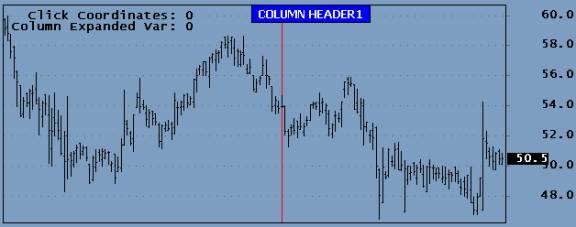
Clicking on the Header Button will expand the column to look as show below:
![clip_image002[5]](http://www.amibroker.org/userkb/wp-content/uploads/2008/03/clip-image0025.jpg)
A few variables are displayed in the Title to facilitate debugging. The following listing shows the test code used to display the above Button Column. Note again that there are two ways to process button clicks: using the values returned by the button functions, or using the Switch() statement.
#include <ControlPanelInclude-003.afl>

global ColNumber;
RequestTimedRefresh(1);
ButtonHeight = Param("Button Height",20,5,200,1);
ButtonWidth = Param("Button Width",120,5,200,1);
PanelYoffset = Param("Button Row Offset (px)",10,0,Status("pxheight"),1);
PanelXoffset = Param("Button Column Offset (px)",10,0,Status("pxwidth"),1);
FontRatio = Param("Font: ButtonHeight ratio",2,1,20,0.1);

ButtonColumnBegin( "1" );
ButtonHeader( "COLUMN HEADER1", colorBlue, colorLightBlue,colorWhite);
ButtonText( "AUTO-TRADING ON", colorBlue, colorWhite);
Reset = ButtonTrigger( "START SESSION", colorBrightGreen, colorRed, colorBlack);
CancelAll = ButtonTrigger( "CANCEL ALL", colorBrightGreen, colorRed, colorBlack);
CloseAll = ButtonTrigger( "CLOSE ALL", colorBrightGreen, colorRed, colorBlack);
EndSession = ButtonTrigger( "END SESSION", colorBrightGreen, colorRed, colorBlack);
ButtonColumnEnd( );

ClickCoordinates = Nz(StaticVarGet("ClickCoordinates"));
switch( ClickCoordinates )
    {
    case 101:
    Say( "1 1");
    break;
    case 102:
    Say( "1 2");
    break;
    case 103:
    Say( "1 3");
    break;
    case 104:
    Say( "1 4");
    break;
    case 105:
    Say( "1 5");
    break;
    case 106:
    Say( "1 6");
    break;
    }

Plot(C,"",1,128);

Title = "\n"+
"  Click Coordinates: "+ClickCoordinates+"\n"+
"Column Expanded Var: "+Nz(kStaticVarGet(ColName+"ColExpanded"));
The ButtonHeader() is similar to the ButtonText() function but has a Collapse/Expand variable added. Here is the code for the new ButtonHeader() function:
function ButtonHeader( Label, backColor1, BackColor2, TextColor)
    {
    global ColNumber, RowNumber, ColExpanded, Colname;
    RowNumber = Nz(kStaticVarGet("RowNumber"+ColName))+1;
    kStaticVarSet("RowNumber"+ColName, RowNumber);
    Trigger = GetMouseClick( ColNumber, RowNumber );
    if( Trigger )
        {
        BackColor = backColor2;
        ColExpanded = Nz(kStaticVarGet(ColName+"ColExpanded"));
        if( ColExpanded ) kStaticVarSet(ColName+"ColExpanded", False);
        else kStaticVarSet(ColName+"ColExpanded", True);
        }
    else BackColor = backColor1;
    ColExpanded = Nz(kStaticVarGet(ColName+"ColExpanded"));
    kStaticVarSetText("TextButton"+ColName+RowNumber, Label);
    kStaticVarSet("TextColor"+ColName+RowNumber, TextColor);
    kStaticVarSet("BackColor"+ColName+RowNumber, backColor);
    }
In the above code, when the left Mouse button is clicked, a static variable named ColExpanded is toggled between True and False. All earlier button functions have been modified to only execute their internal code only if this variable is True. This way Buttons will only display if the variable ColExpanded it True. The listing below shows how the TriggerButton() was modified. This and the HeaderButton functions are located in the Include file at the end of this post; there is no need to copy them separately.
function ButtonTrigger( Label, backColor1, BackColor2, TextColor)
    {
    global ColNumber, RowNumber, ColName;
    ColExpanded = Nz(kStaticVarGet(ColName+"ColExpanded"));
    if( ColExpanded )
        {
        ColName = VarGetText("ColName");
        RowNumber = Nz(kStaticVarGet("RowNumber"+ColName))+1;
        kStaticVarSet("RowNumber"+ColName, RowNumber);
        Trigger = GetMouseClick( ColNumber, RowNumber );
        if( Trigger ) BackColor = backColor2; else BackColor = backColor1;
        kStaticVarSetText("TextButton"+ColName+RowNumber, Label);
        kStaticVarSet("TextColor"+ColName+RowNumber, TextColor);
        kStaticVarSet("BackColor"+ColName+RowNumber, backColor);
        }
    else Trigger = 0;
    return Trigger;
    }
The new ControlPanelInclude-003.afl Include file is listed below, it must be copied to your default Include folder for the above code to work.
// ControlPanelInclude-003.afl
procedure kStaticVarSet( SName, SValue )
    {
    ChartID = GetChartID();
    InIndicator = Status("Action") == 1;
    if( InIndicator ) StaticVarSet(Sname+ChartID, Svalue);
    }

function kStaticVarGet( SName )
    {
    ChartID     = GetChartID();
    Var = StaticVarGet(Sname+ChartID);
    return Var;
    }

procedure kStaticVarSetText( SName, SValue )
    {
    ChartID     = GetChartID();
    InIndicator = Status("Action") == 1;
    if( InIndicator ) StaticVarSetText(Sname+ChartID, Svalue);
    }

function kStaticVarGetText( SName )
    {
    ChartID = GetChartID();
    return StaticVarGetText(Sname+ChartID);
    }

function NewColumn()
    {
    VarSet("ColNumber", 0);
    }

function GetMouseClick( ColNumber, RowNumber )
    {
    global PanelYoffset, PanelXoffset, ButtonHeight, ButtonWidth;
    LButtonDown = GetCursorMouseButtons() == 9;
    Click = 0;
    if( LButtonDown )
        {
        ULButtonX         = PanelXoffset + (ColNumber-1) * ButtonWidth;
        LRButtonX        = ULButtonX + ButtonWidth;
        ULButtonY         = (RowNumber -1) * ButtonHeight + PanelYoffset;
        LRButtonY        = ULButtonY + ButtonHeight;
        MouseCoord = Nz(StaticVarGet("ClickCoordinates"));
        if( MouseCoord == 0 AND LButtonDown )
            {
            MousePx = GetCursorXPosition( 1 );
            MousePy = GetCursorYPosition( 1 );
            if( MousePx > ULButtonX AND MousePx < LRButtonX AND MousePy > ULButtonY AND MousePy < LRButtonY )
                {
                StaticVarSet("ClickCoordinates",ColNumber*100+RowNumber);
                Click = 1;
                }
            }
        }
    return Click;
    }

function ButtonColumnBegin( ColName )
    {
    global FontRatio, ColName, ColNumber, ButtonHeight, ButtonWidth, PanelXoffset, PanelYoffset, Colname;
    ColNumber = VarGet("ColNumber");
    if( IsEmpty( ColNumber ) )
        {
        VarSet("ColNumber",1);
        StaticVarSet("ClickCoordinates",0);
        }
    else VarSet("ColNumber", ++ColNumber);
    ColName = ColName+GetChartID();
    kStaticVarSet("RowNumber"+ColName, 0);
    VarSetText("ColName",ColName);
    GfxSetOverlayMode( 0 );
    GfxSelectFont( "Tahoma", ButtonHeight/FontRatio, 800 );
    GfxSelectPen( colorBlack );
    GfxSetBkMode( 1 );
    }

function ButtonText( TextButton, backColor, TextColor)
    {
    global ColNumber, RowNumber, Colname;
    ColExpanded = Nz(kStaticVarGet(ColName+"ColExpanded"));
    if( ColExpanded )
        {
        ColName = VarGetText("ColName");
        RowNumber = Nz(kStaticVarGet("RowNumber"+ColName))+1;
        kStaticVarSet("RowNumber"+ColName, RowNumber);
        kStaticVarSetText("TextButton"+ColName+RowNumber, TextButton);
        kStaticVarSet("TextColor"+ColName+RowNumber, TextColor);
        kStaticVarSet("BackColor"+ColName+RowNumber, backColor);
        }
    }

function ButtonTrigger( Label, backColor1, BackColor2, TextColor)
    {
    global ColNumber, RowNumber, ColName;
    ColExpanded = Nz(kStaticVarGet(ColName+"ColExpanded"));
    if( ColExpanded )
        {
        ColName = VarGetText("ColName");
        RowNumber = Nz(kStaticVarGet("RowNumber"+ColName))+1;
        kStaticVarSet("RowNumber"+ColName, RowNumber);
        Trigger = GetMouseClick( ColNumber, RowNumber );
        if( Trigger ) BackColor = backColor2; else BackColor = backColor1;
        kStaticVarSetText("TextButton"+ColName+RowNumber, Label);
        kStaticVarSet("TextColor"+ColName+RowNumber, TextColor);
        kStaticVarSet("BackColor"+ColName+RowNumber, backColor);
        }
    else Trigger = 0;
    return Trigger;
    }

function ButtonHeader( Label, backColor1, BackColor2, TextColor)
    {
    global ColNumber, RowNumber, ColExpanded, Colname;
    RowNumber = Nz(kStaticVarGet("RowNumber"+ColName))+1;
    kStaticVarSet("RowNumber"+ColName, RowNumber);
    Trigger = GetMouseClick( ColNumber, RowNumber );
    if( Trigger )
        {
        BackColor = backColor2;
        ColExpanded = Nz(kStaticVarGet(ColName+"ColExpanded"));
        if( ColExpanded ) kStaticVarSet(ColName+"ColExpanded", False);
        else kStaticVarSet(ColName+"ColExpanded", True);
        }
    else BackColor = backColor1;
    ColExpanded = Nz(kStaticVarGet(ColName+"ColExpanded"));
    kStaticVarSetText("TextButton"+ColName+RowNumber, Label);
    kStaticVarSet("TextColor"+ColName+RowNumber, TextColor);
    kStaticVarSet("BackColor"+ColName+RowNumber, backColor);
    }

function ButtonColumnEnd()
    {
    global ButtonHeight, ButtonWidth, PanelYoffset, PanelXoffset, ColNumber, RowNumber, ColName;
    ChartIDStr     = NumToStr(GetChartID(),1.0,False);
    ULButtonX         = PanelXoffset + (ColNumber-1) * ButtonWidth;
    LRButtonX        = ULButtonX + ButtonWidth;
    for( Row = 1; Row <= RowNumber; Row++ )
        {
        ULButtonY         = (Row-1) * ButtonHeight + PanelYoffset;
        LRButtonY        = ULButtonY + ButtonHeight;
        Label     = kStaticVarGetText("TextButton"+ColName+Row);
        TextColor     = Nz(kStaticVarGet("TextColor"+ColName+Row));
        BackColor     = Nz(kStaticVarGet("BackColor"+ColName+Row));
        GfxSelectSolidBrush( BackColor);
        GfxRectangle( ULButtonX, ULButtonY, LRButtonX, LRButtonY );
        GfxSetBkColor( BackColor);
        GfxSetTextColor( TextColor );
        GfxDrawText( Label, ULButtonX, ULButtonY, LRButtonX, LRButtonY, 32 | 1 | 4);
        }
    }
 Filed by Herman at 12:52 pm under Real-Time Control-Panels
Comments Off on Button Header (Collapse/Expand)