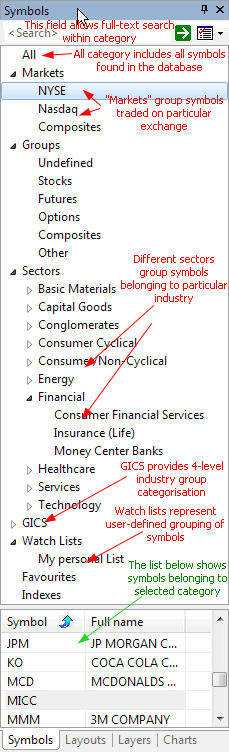
Symbols window is divided into three
parts:
a) search box
b) category tree
c) symbol list
The search box allows you to perform full text searches (including wildcard matching) against symbol and full name within the selected category. For example, if you select "Technology" sector and type A* (letter 'A' and wildcard character *), the symbol list will show all symbols belonging to the Technology sector with a symbol or full name beginning with the letter 'A'. Another example would be typing *-A0-FX - this will return all forex symbols in the eSignal database (those ending with -A0-FX substring).
The category tree (see the picture) shows different
kinds of categories.
The symbol list (bottom part) shows the list of symbols belonging
to the selected category. The symbol list can be sorted by symbol or by full name.
To sort, just click on the header row of the list. Once you choose the desired sorting
order, it will be kept for all subsequent category choices and searches. Also,
the order of columns can be changed so the Full name column appears as the first one.
To re-arrange a column, click on the column header, hold down the mouse button
and drag the column to the desired location. Then release the mouse button.
A single symbol belongs to many categories at the same time. For example, AAPL (Apple Inc.) will belong to:
- Stocks group category
- Nasdaq market category
- Information sector category
- Comp-Computer Mfg industry category
and may also belong to several watch lists and favorites categories. All at the same time. That's why one symbol will appear in many leaves of the workspace symbol tree. Now, if you delete the symbol, it will of course disappear from all categories because you have deleted the symbol itself, not its assignment to a category.