Real-time quote window
Working with real-time quote window
The RT quote window provides real-time streaming quotes and some basic fundamental
data. It is fairly easy to operate as shown in the picture below:
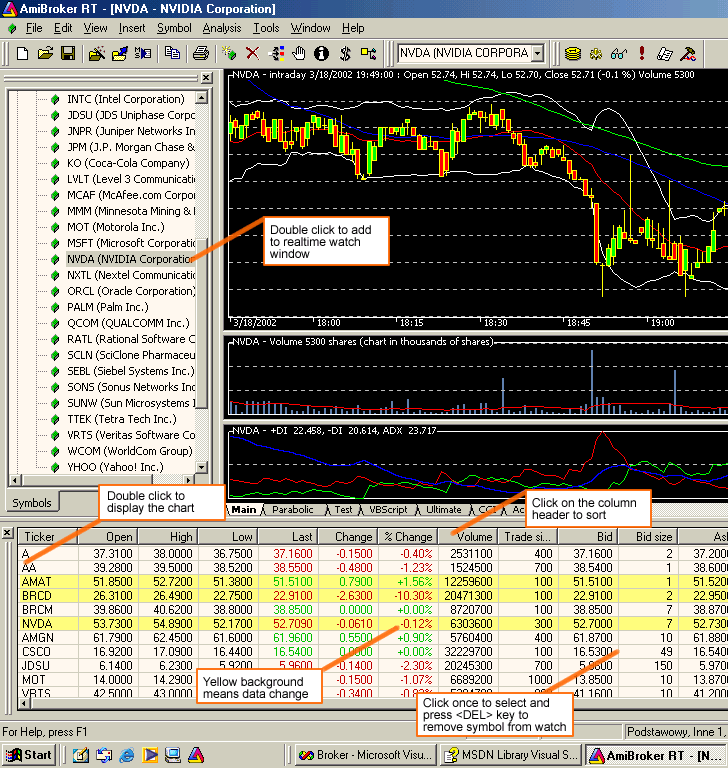
You can also display a context menu by pressing the right mouse button over the RT quote
window.
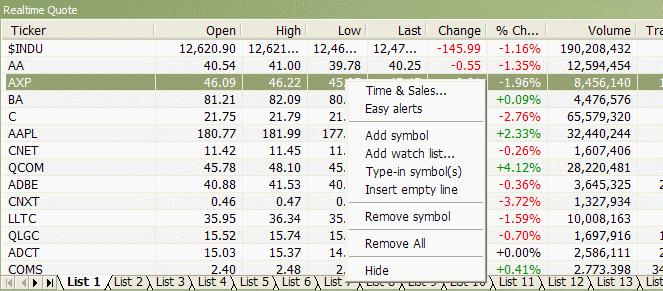
The context menu allows you to access the following options:
- Time & Sales
Opens Time & Sales window that provides
information about every bid, ask, and trade streaming from the market.
- Easy Alerts
Opens Easy Alerts window that provides a way to define real-time alerts executed
when bid/ask/last and other fields hit user-defined levels.
- Add Symbol
Adds the current symbol to the Real-time Quote list.
- Add watchlist...
Adds the entire watchlist to the real-time quote window.
- Type-in symbols
Allows you to type the symbols directly as a comma-separated list.
- Insert empty line
Adds an empty (separator) line, useful for grouping symbols.
- Remove Symbol
Removes the highlighted line (symbol) from the Real-time Quote list.
- Remove All
Removes all symbols from the real-time quote list.
- Hide
Hides the Real-time Quote list.
Re-arranging symbols using drag-and-drop
Real-time quote window now (v5.10 and up) allows you to rearrange the list
of symbols by a drag-and-drop mechanism. Simply click the left mouse button over
the symbol, hold it down, and drag to the desired location, then release the button.
Bid/ask trend indicator

Version 5.90 adds Bid/Ask trend - a graphical indicator showing the direction
of the 10 most recent changes in real-time bid/ask prices.
The right-most box is the most recent, and as new bid/ask quotes arrive, they are
shifted to the left side. Color coding is as follows:
- Dark green: bid > previous
bid OR ask > previous ask
- Bright green: bid > previous bid AND ask > previous
ask
- Dark red: bid < previous bid OR ask < previous ask
- Bright red: bid < previous
bid AND ask < previous ask
- Red / Green box: ask < previous ask AND bid > previous
bid
- Green / Red box: ask > previous ask AND bid < previous bid
If bid/ask prices don't change, there is no new box. NOTE: This column works
only if there are real-time quotes streaming (markets are open).