How to download quotes manually using AmiQuote
Introduction
The purpose of this document is to explain how to use AmiQuote and AmiBroker
in order to obtain quotes from Yahoo Finance and Quote.com.
AmiQuote
is
a companion program to AmiBroker charting/analysis software. The main
purpose of AmiQuote is to simplify and automate downloading daily and historical
quotation data from free Yahoo! Finance (USA, major European exchanges and
some other countries), Quote.com (USA only), MSN (USA and some European
exchanges), Integratir (US stocks), Forex (Finam's free site)
Yahoo provides data in "Historical" and "Current" modes
of AmiQuote. Quote.com provides data in "Intraday" mode of AmiQuote.
Preparing ticker list
A ticker list is a simple text file which lists line by line the tickers you
want to import. The AmiQuote ticker list file has the .TLS extension. AmiQuote comes
with pre-written ticker lists for components of the main NYSE and NASDAQ indices
and a number of European indices/markets. Additional ticker lists are available
on the starter page at: http://www.amibroker.com/starter/.
You can use those pre-written ticker lists, or you can customize them or write
your own. In order to edit an existing .TLS file or write a completely new one,
all you need is a plain text editor such as Notepad or any other plain ASCII editor
(not MS Word!). All you have to do is to write tickers you want to import line
by line (single ticker in single line) and save the file. Please make sure that
you are saving the file with the .TLS extension. Otherwise, AmiQuote will not load
this file.
Please note that Yahoo uses suffixes for non-US stocks. So, in order to get
quotes for non-US symbols, you would need to add the appropriate suffix to the ticker
symbol. The suffixes in alphabetical order are (click on a link to get the symbol list for each exchange): .AS
- Amsterdam, .AX
- Australia (ASX), .BC
- Barcelona, .BE
- Berlin, .BO
- Bombay, .BM
- Bremen, .BR
- Brussels, .BA
- Buenos Aires, .CL
- Calcutta, .CR
- Caracas, .V
- CDNX, .CO
- Copenhagen, .D
- Dusseldorf, .F
- Frankfurt, .H
- Hamburg, .HA
- Hanover, .HK
- Hong Kong, .I
- Ireland, .JK
- Jakarta, .KA
- Karachi, .KQ
- Kosdaq, .KS
- KSE, .KL
- Kuala Lumpur, .L
- London, .LM
- Lima, .LS
- Lisbon, .MA
- Madrid, .MX
- Mexico, .MI
- Milan, .MU
- Munich, .NS
- NSE, .NZ
- New Zealand, .OL
- Oslo, .PA
- Paris, .SN
- Santiago, .SS
- Shanghai, .SZ
- Shenzhen, .ST
- Stockholm, .SG
- Stuttgart, .TW
- Taiwan, .TA
- Tel Aviv, .TO
- Toronto, .VA
- Valencia, .VI
- Vienna, .DE
- XETRA, .S - Zurich.
Please note that Yahoo and Quote.com also use different symbols for indices.
The main difference is that Yahoo uses ^ (dash) prefix and Quote.com uses $
(dollar) prefix.
For a list of indices provided by Yahoo please click
here.
For a list of indices provided by Lycos/Quote.com please click
here. Please note that recently Lycos/Quote.com stopped delivering free
quotes and you need to have a Livecharts subscription ($9.95/month) in order
to use it. For more details, see this
Knowledge Base article.
For a list of symbols provided by MSN please click
here.
Downloading data
|
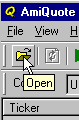
In order to download the data, please launch AmiQuote. Then, please click
on the "Open" button in the toolbar (or choose File->Open
menu) as shown in the picture on the right.
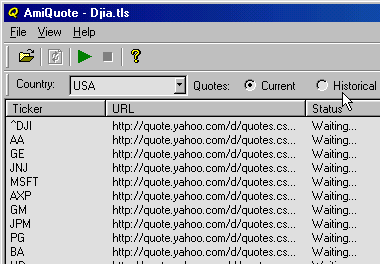
From the file dialog, please choose a .TLS file (for example DIJA.TLS)
and click the Open button. Then you will see the main screen
of AmiQuote filled with the list of tickers loaded, as shown in the picture
below.

|
|
Choose the appropriate Data Source
- Yahoo Historical - allows you to download end-of-day histories up to
the current day (current day data appear a few hours after session end)
- Yahoo Current - allows you to download current day quotes (15-min
delayed) during the trading session
- Lycos/Quote.com Intraday - allows you to download intraday and daily
historical data (1-min bars and up) - for US stocks/futures only. If you have
chosen
this mode,
you should also select the bar interval (see the limitations described below)
- requires a Livecharts subscription ($9.95/month)
- MSN Historical - allows you to download end-of-day histories up to
the current day (current day data appear a few hours after session end)
- Forex - allows you to download end-of-day and intraday (registered
version) histories for the following currency pairs: EURCHF, EURGBP, EURJPY,
EURUSD, GBPUSD, USDCHF, USDJPY
After choosing the correct options, please click on the green arrow (or use File
-> Start Download menu). The download process will begin. AmiQuote
will display progress messages and status information, including the number of completed
downloads and the number of files left. At any time, you can stop the download process
with the "Stop" button (red box). After the download finishes, AmiQuote
will automatically update the quotes in AmiBroker (provided AmiBroker is
running in parallel and the "automatic import" checkbox in AmiQuote is checked).
Limitations
Intraday interval bar data (1-min, 5-min, 15-min, 60-min and 120-min) is available
for US securities only. Historical data for international exchanges is usually
much shorter than for US markets.
Because intraday bar data is downloaded from Quote.com servers, the ticker
symbols for indices are different from those used by Yahoo. For a complete reference,
please check http://finance.lycos.com/home/misc/symbol_search.asp?options=i
Intraday bar data is limited to 500 bars regardless of bar interval. In other
words, you always get 500 bars of data, whether these are 1-min, 5-min, 15-min,
60-min or 120-min data - so by choosing a bigger interval, you get data from more
days. This is the limitation imposed by the Livecharts server.
Importing quotes into AmiBroker
NOTE: This step is no longer necessary if you are
using the "automatic import" feature in AmiQuote. The explanations are
provided only for users who want to import selectively or re-import files downloaded
in the past.
First, please launch AmiBroker. From the File menu, please select
Import From ASCII option. You will see the following file dialog:
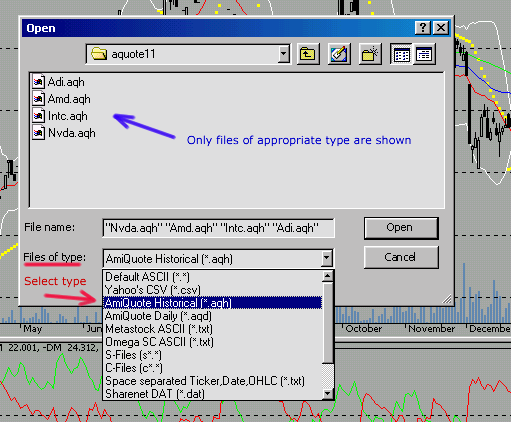
In this picture, I have marked the most important items for easy identification.
Marked in red is the type selector combo-box ("Files of type").
In order to import AmiQuote files (those with .AQH and .AQD extensions), you
should
choose AmiQuote Historical or AmiQuote Daily, or AmiQuote
Intraday (.AQI), or AmiQuote MSN (.AQM), or AmiQuote eSignalCentral
(.AQE) from
the combo box (the red arrow shows these options).
After choosing the right type, you will see only files of the appropriate type in
the file list (the blue arrow shows this). Now you can select one or more files
from
the
list. Multiple selection is possible by holding the CTRL key depressed while selecting
the items with a mouse (you can also press SHIFT to choose a range of files
with a single click). Now, when you are done choosing the files you want to
import, just click the "Open" button. The import process
will start and you will see a progress bar showing that AmiBroker is importing
the data. After
finishing the import, AmiBroker will automatically refresh the symbol list and you
will see updated tickers and charts. If anything goes wrong with the import
process, AmiBroker writes a log file called "import.log", which is located
in AmiBroker's main directory. You can examine this log file if you want to
find
out what went wrong (since import.log is a simple text file, you can open it with
any text editor)
Common questions
|
Question
|
Answer |
| How can I edit my own ticker list (.TLS)
file? |
You can create or edit .TLS files using Windows Notepad. When saving a file,
simply give the file a .TLS extension (instead of the default .TXT extension)
|
| What about ready-to-use complete ticker
lists for NYSE, NASDAQ, AMEX? |
The following ready-to-use ticker lists are available for download:
|
Further information
For further information, please consult AmiBroker User's Guide section "Data
management - Importing data from ASCII file". In case of any further
questions, comments, or suggestions, please use the customer
support page at http://www.amibroker.com/support.html